The Problem Was My Own Network
Last time I wrote about Zero Trust, I added the full Cloudflare stack to this website — Access, Gateway, Tunnel, WARP, Browser Isolation, CASB, DLP. Seven products on a blog. That was about protecting a site.
This is about protecting my house.
Two laptops sit on my home network. A personal Mac and a Cloudflare-issued work machine. Until last week, they shared a flat network with roughly 37 IoT devices: cameras, a baby monitor, Sonos speakers, Rokus, Samsung TVs, game consoles, a smart lock, a pool controller, smart appliances, air purifiers, a solar inverter, a robot vacuum — and an unidentified device the router insisted was a “Vernee V2 Pro,” a discontinued Chinese rugged phone from 2018 that nobody in my house has ever owned.
Every one of those devices could reach every other device. My dishwasher could talk to my work laptop. A compromised Ring camera had a direct path to the machine carrying customer data. Not because I configured it that way — because I never configured it at all. A flat network grants everything by default.
The goal was never to prevent IoT compromise. You cannot patch a Ring camera. You cannot install an agent on a dishwasher. You cannot update the firmware on a pool controller that hasn’t had a software release since 2021. The goal was to make compromise a dead end. A camera gets owned? Fine. It can talk to Ring’s servers and nothing else on my network.
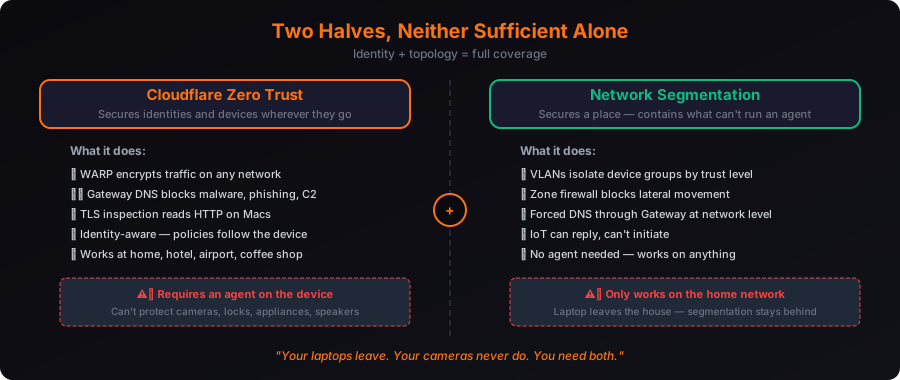
The Insight: Two Halves, Neither Sufficient Alone
This is the part that surprised me. I expected Cloudflare Zero Trust to solve the whole problem. It doesn’t. Not because of a gap in the product — because of a gap in what’s possible.
Cloudflare Zero Trust secures devices that can run an agent. WARP wraps traffic in an encrypted tunnel on any network — home, hotel, airport. Gateway filters DNS against threat intel. On the Macs, TLS inspection reads HTTP traffic. It’s identity-aware and it follows the device off the network. When my laptop leaves the house and connects to hotel Wi-Fi, the same policies apply. That’s the whole point.
But it does nothing for the 37 devices that can’t run it. And WARP explicitly does not protect LAN-to-LAN traffic — it encrypts what leaves for the internet, not what a compromised camera sends to your laptop two IPs away on the same subnet.
So the second half is network segmentation. VLANs, a zone-based firewall, forced DNS. That half contains the agentless devices.
Zero Trust secures identities and devices wherever they go. Segmentation secures a place. Your laptops leave. Your cameras never do. You need both.
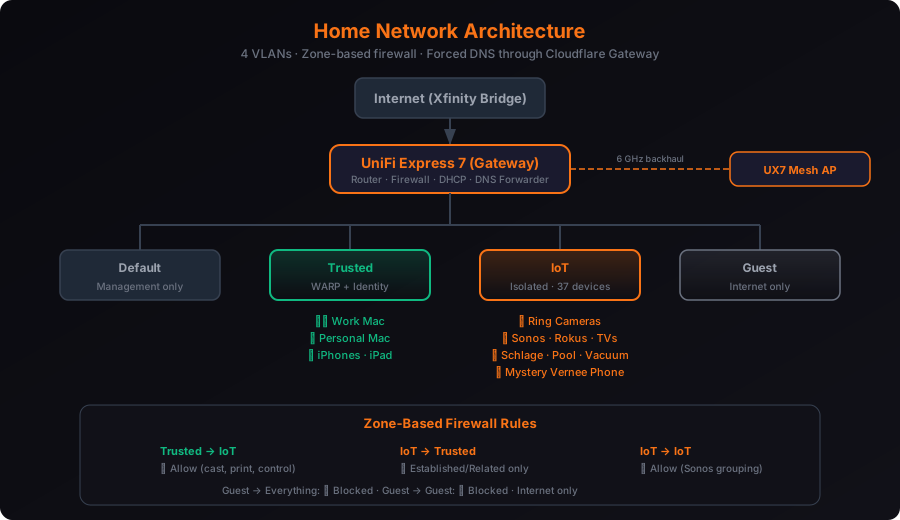
The Build
Layer 1 — Cloudflare Zero Trust (the managed devices)
Five devices enrolled: two Macs, two iPhones, one iPad. Each one running WARP with Gateway DNS and HTTP policies.
The DNS policies block eight security categories: malware, phishing, command-and-control/botnet, spyware, domain generation algorithms, DNS tunneling, cryptomining, and newly seen domains. On the Macs, TLS inspection is on — Gateway can read the actual HTTP request and response, not just the DNS query. On iOS, it’s DNS-only because Apple restricts how deeply a third-party VPN profile can inspect traffic.
Device profiles split by OS and identity. The Macs get full inspection. The phones get DNS filtering and content categories. Every device gets the same threat categories blocked regardless.
For the networks that can’t run an agent — the IoT VLAN and the guest network — I created DNS locations in Gateway. Those networks point their DNS at Cloudflare’s resolver with a registered source IP, so Gateway applies filtering at the network level even though no device on those networks has WARP installed.
Layer 2 — Network Segmentation (the rest)
The Xfinity gateway went into bridge mode. It’s a dumb modem now. All routing, firewall, DHCP, and Wi-Fi moved to two UniFi Express 7s — one as the primary gateway in the kitchen, one as a mesh access point in the office, connected over a 6 GHz wireless backhaul. No cable run needed.
Four networks, four trust levels:
Default is the management console. Only the UniFi controller traffic lives here.
Trusted is laptops, phones, tablets — devices that run WARP and have identity. This network gets a new SSID that didn’t exist before.
IoT is everything else. Cameras, speakers, appliances, game consoles, that mystery Vernee phone. Isolated by VLAN, firewalled at the zone boundary, DNS forced through Gateway.
Guest is visitors. Blocked from every internal network, blocked from every device including each other. Internet access only.
The Rule the Whole Project Exists For
The zone-based firewall has one rule that justifies the entire build:
IoT → Internal: Allow Established/Related Only.
A compromised camera can reply to my Mac — if my Mac initiated the connection. It can initiate nothing. Not “blocked by a policy that might be misconfigured.” There is no route. It’s the same reason you can’t ping a machine in your neighbor’s house. The networks are separate. The firewall permits return traffic and drops everything else.
Internal → IoT stays open, so AirPlay casting, printing, and Sonos control still work — my phone can tell the speaker to play music, and the speaker can stream it. IoT → IoT stays open so Sonos multi-room grouping works across speakers. Guests are blocked from everything, including each other — no device on the guest network can discover or reach any other device on any network.
Where It Went Wrong
These are the most useful parts of the post. Every one of them taught me something I couldn’t have learned from documentation.
The SSID Trick That Saved a Weekend
Migrating 37 IoT devices to a new isolated VLAN should mean re-onboarding 37 devices by hand. Factory-resetting a Schlage lock. Re-pairing five Sonos speakers. Finding the app for a solar inverter that hasn’t been updated since the Obama administration.
Instead: the new IoT SSID reuses the old network’s exact name and password.
From each device’s perspective, nothing changed. It looked for the network it always joined, found it, and reconnected. The VLAN tag, subnet, firewall zone, and DNS servers underneath were completely different. The Schlage lock doesn’t know it’s quarantined. The pool controller doesn’t know it can’t reach my laptop anymore. They just connected to “the Wi-Fi” and ended up in a different trust zone.
37 devices migrated themselves. Zero re-provisioning. The trusted devices got a brand-new SSID, so the old credential now only opens the door to the quarantine zone. Anyone who had my old Wi-Fi password — a houseguest, a contractor, anyone — can connect and reach nothing but the internet.
Cloudflare’s Own DLP Blocked Claude
Turned on TLS inspection. Claude Desktop immediately died.
The error: “API Error: empty or malformed response — check for a proxy or gateway intercepting the request.”
My first guess was certificate pinning — Electron apps sometimes bundle their own CA store and reject the inspection certificate. That was wrong. The Gateway logs told a different story: a DLP policy inherited from an old demo configuration, named “Log Sensitive Data Uploads,” was set to Block, and it was hard-blocking api.anthropic.com. The API authentication tokens in request headers matched the “Credentials and Secrets” DLP profile.
All 94 blocks in the first hour came from that one policy. It also killed Datadog telemetry, a Google optimization endpoint, and an Apple service.
Two lessons I won’t forget:
Enabling the Gateway proxy activates every dormant HTTP policy at once. Those demo policies had been decorative for six months because nothing was inspecting traffic. DNS-only mode doesn’t evaluate HTTP policies — they just sit there looking active in the dashboard. The moment I turned on TLS inspection, every one of them started enforcing. One click made six months of forgotten configs real.
DLP “Credentials and Secrets” false-positives heavily on legitimate API traffic. Any app that sends an API key in a request header — which is most of them — will match. Never ship it in Block mode without a log-only soak period first. I switched it to Log, reviewed a week of results, and built explicit bypass rules for the services I trust before turning enforcement back on.
Apple Blocks Child Accounts From Installing VPN Profiles
One device in the house wouldn’t enroll in WARP. Authentication succeeded — I could see the login event on the server side, twice — but the app bounced back to the login screen every time.
I ruled out Screen Time restrictions, leftover VPN profiles, app reinstall, parental control apps, seat limits, and iOS version. Nothing matched.
The root cause: the Apple ID was a child account, and Apple blocks child Apple IDs from installing VPN or configuration profiles at the account level. It cannot be overridden through Screen Time settings. It’s an anti-circumvention feature — Apple doesn’t want a kid installing a VPN to bypass parental controls.
The irony is sharp: the feature that stops a child from installing a VPN to escape parental filtering also stops the parent from installing filtering.
The workaround is arguably better anyway. Filter at the network level — the router’s DNS points to Gateway, so every VLAN gets Cloudflare’s DNS filtering whether the device runs WARP or not. Off-network, Apple’s own Screen Time handles content filtering. A device that can’t run an agent gets treated like IoT: protected by the network it’s on, not by software it’s running. Which is the thesis of the entire post, applied to a phone that can’t run the agent.
The Wrong IP That Failed Silently
This is the scariest failure in the whole build because nothing broke.
I pointed the router’s DNS at Cloudflare Gateway. All devices resolved DNS normally. Pages loaded. Streaming worked. No errors anywhere. But nothing appeared in the Gateway logs. Not an error. Not a warning. Nothing.
The DNS location was registered to one IP. The ISP had actually assigned a different one. Cloudflare received the DNS queries from an IP it didn’t recognize, resolved them normally through its public resolver, and attributed them to nobody. Every device on the network was working perfectly and completely unfiltered.
A control that silently disables itself isn’t a control.
This happens because IPv4 DNS attribution works by source IP — Cloudflare’s anycast resolver handles everyone’s queries, and the only thing identifying yours as yours is the IP address they come from. If that address doesn’t match your registered location, the queries still resolve. They just don’t get your policies.
IPv6 and DNS-over-HTTPS don’t have this problem. Both use unique per-location resolver endpoints, so your identity is in the destination address, not the source. If I’d been using either, the misconfiguration would have been a hard failure — queries to a wrong endpoint either fail or route to a location that immediately identifies them. Silent pass-through isn’t possible. That’s a strong argument for DoH on home networks where your ISP might rotate your IP without telling you.
Two-Tier Fix for Broken Apps
thinkorswim (my trading platform) and PokerStars both broke under TLS inspection, and the “Do Not Inspect” exemption that fixed Claude didn’t work for either of them.
Two different problems needed two different fixes:
Do Not Inspect works when an app speaks normal HTTPS but pins its certificate. Gateway stops decrypting — the app’s traffic still routes through Cloudflare, DNS is still logged, HTTP policies still apply to the metadata. You lose content inspection but keep visibility. This fixed Claude.
Split tunnel exclude is the nuclear option. When an app uses custom protocols, streaming connections, non-standard ports, or anything that isn’t plain HTTPS, HTTP policies can’t apply at all. Excluding it from the tunnel means the traffic bypasses Cloudflare entirely — total blind spot. No DNS logging, no policy enforcement, nothing. This fixed thinkorswim and PokerStars.
There’s a real gotcha here: hostname lists match exactly, not by subdomain. Adding schwab.com to the Do Not Inspect list did nothing for thinkorswim-desktop1.gslb.schwab.com. You have to match the actual hostname the app resolves.
The technique that beat guessing: filter Gateway’s DNS logs by a keyword — “schwab,” “pokerstars” — and read the actual hostnames the app is resolving. Thirty seconds of log reading versus two rounds of adding domains and restarting.
Everything Needs a Reboot
This deserves one honest line. Pause/resume was never enough. Proxy mode changes, split tunnel changes, certificate installs — every single one needed a full WARP restart to take effect. Sometimes an app restart. Sometimes an OS restart. Build time for reboots into your evening.
The Numbers
| IoT devices migrated with zero re-provisioning | 37 |
| Hardware cost | ~$428 (2× UniFi Express 7) |
| Devices enrolled in Cloudflare Zero Trust | 5 |
| Networks / trust levels | 4 |
| Blocks from one misconfigured DLP policy in the first hour | 94 |
| Throughput the old ISP gateway was hiding | 242 Mbps → 1,000+ Mbps |
That throughput number deserves a callout. The Xfinity gateway’s Wi-Fi was delivering 242 Mbps at peak. The moment the UniFi Express 7 measured the actual WAN speed, it saw over 1,000 Mbps. The gateway had been throwing away three-quarters of the bandwidth I was paying for. A performance win that was entirely incidental to a security project.
Don’t Misread the Firewall Counter
One thing I want to correct preemptively, because I almost made this mistake myself: the zone-based firewall’s default-deny counter is not a threat counter.
When you segment a network and set the default policy to drop, the counter increments every time a device on one VLAN tries to reach a device on another and gets dropped. That’s mostly normal cross-boundary chatter — mDNS discovery, SSDP broadcasts, ARP requests that hit the wrong subnet. A Sonos speaker looking for other speakers on a network it can’t see. A Roku sending a discovery packet that hits the firewall and dies.
Those aren’t attacks. They’re devices doing what devices do on a network that now has walls.
Real threat blocks show up in Cloudflare Gateway with a security category attached — malware, phishing, C2, cryptomining. Those are the numbers that matter. The firewall counter tells you segmentation is working. The Gateway logs tell you something was actually trying to hurt you.
That distinction is worth understanding because most home networking posts screenshot a firewall counter with a big number and call it “blocked attacks.” It’s not. It’s traffic hygiene. If you can’t tell the difference between the two, you can’t tell whether your security is working or your network is just noisy.
What Got Deleted
The pattern from the email post was “what got deleted” — what dependency or assumption disappeared. Here, what got deleted isn’t a dependency. It’s reachability.
Before this build, every device on my network could reach every other device. 37 IoT devices × 2 laptops = a lot of implicit trust. None of it was chosen. All of it was default. A compromised camera had the same network access as my work laptop — not because anyone decided that was okay, but because nobody ever decided it wasn’t.
Now the paths that exist are the ones I deliberately allowed. The camera can answer when my Mac asks. It can’t ask. The pool controller can reach iAquaLink’s servers. It can’t reach my file share. The Schlage lock can phone home to Schlage. It can’t phone anywhere else.
This didn’t make my house unhackable. A Ring camera can still be compromised through Ring’s own cloud infrastructure and there’s nothing I can do about that from my network. What changed is the blast radius — from “everything on the network, including two laptops carrying customer data and work product” to “that one device, on an isolated VLAN, with its lateral movement blocked and its DNS logged.”
The camera can answer. It can’t ask. That’s the whole project in one sentence.