The Progression
Six weeks ago, I shipped “Ask This Blog” — a text box where you could ask a question and get an AI-generated answer sourced from my blog posts. It was a single-turn RAG pipeline: embed the query, search Vectorize, generate a response, done. Stateless. One question, one answer, no memory.
Then I built V2 — “Ask AI.” WebSockets, Durable Objects, multi-turn conversation. The AI remembered what you said five messages ago. It could search the blog, query the guestbook database, recall facts from previous turns. It felt like a real conversation instead of a search engine.
Both of those were chatbots. They could talk. But they couldn’t do anything.
V3 is different. V3 is an agent.
What’s an Agent?
There’s a spectrum of AI applications, and most people conflate everything into “chatbot.” But there are meaningful architectural differences between a prompt-and-response system, a RAG pipeline, a conversational AI, a tool-using AI, and an autonomous agent.
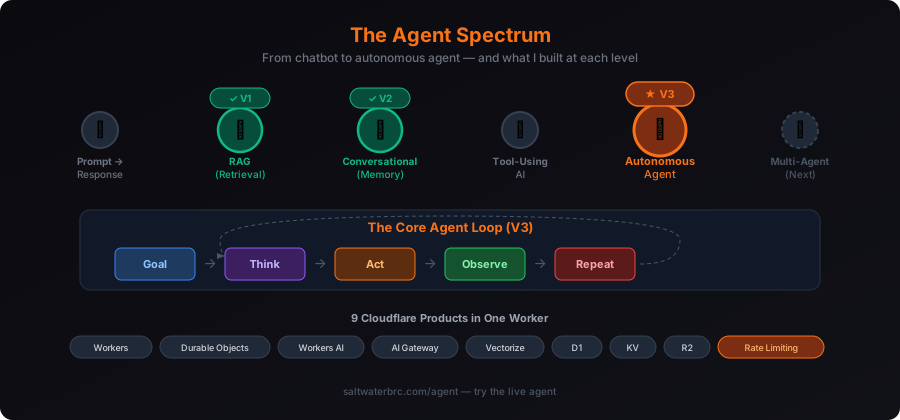
Here’s the short version:
Level 1 — Prompt/Response. You type, AI responds. No memory. No context. This is ChatGPT circa 2023.
Level 2 — RAG. Before responding, the system searches a knowledge base and injects relevant context. Still stateless per request, but the answer is grounded in your data. This was V1.
Level 3 — Conversational AI. Multi-turn. The AI remembers the conversation, refers back to what you said earlier, maintains state across messages. This was V2.
Level 4 — Tool-Using AI. The AI can call functions — search databases, hit APIs, generate files. It decides “I need to look this up” and executes code to do it. The model outputs a structured tool call, the system runs it, feeds the result back, and the model continues.
Level 5 — Autonomous Agent. The AI runs in a loop. It receives a goal, makes a plan, executes steps using tools, observes results, adjusts its approach, and keeps going until the goal is met. It handles errors. It retries. It chains multiple actions. This is V3.
The jump from Level 3 to Level 5 isn’t incremental. It’s architectural. V2 could answer questions. V3 can accomplish goals.
What V3 Can Do
Ask V3 to “research Cloudflare Workers pricing and compare it to AWS Lambda, then generate a visual and save the analysis as a report.” Here’s what happens:
- The agent searches the web via Brave Search API for current pricing data
- It queries the blog via Vectorize for any posts I’ve written about Workers
- It generates an image — a comparison chart rendered by FLUX.2 on Workers AI, stored in R2
- It writes a markdown report and saves it to R2 with a download link
- It stores a memory in KV so next time you ask, it remembers the analysis
Five tools. Five Cloudflare products. One autonomous chain, no human intervention between steps.
That’s not a chatbot. That’s an agent.
The Architecture
V3 runs as a single Cloudflare Worker with 9 product bindings:
User Request
    ↓
Rate Limiting (per-IP, edge-level)
    ↓
WebSocket → Durable Object (session state + chat history)
    ↓
Workers AI (LLM reasoning via AI Gateway)
    ↓
┌──────────┬──────────┬──────────┐
│ Vectorize│    D1    │    KV    │
│ (search) │ (query)  │ (memory) │
└──────────┴──────────┴──────────┘
    ↓
   R2 (exports + generated images)
Every request enters through the Worker, hits native Rate Limiting at the edge before anything else, then routes to a Durable Object that owns the session. The DO manages WebSocket connections, persists chat history in SQLite, and hands off to Workers AI for reasoning. The LLM decides which tools to call. Those tools fan out to Vectorize, D1, KV, or R2 depending on what the agent needs. Every AI inference call routes through AI Gateway for full observability — tokens, latency, cost, all of it in one dashboard.
Nine products. One wrangler deploy.
The Tools
The agent has 9 tools at its disposal. Each one maps to a real Cloudflare product:
| Tool | Products | What It Does |
|---|---|---|
search_blog | Vectorize + Workers AI | Semantic search over my blog posts |
find_use_cases | Workers | Surfaces customer use cases by product |
get_site_stats | Workers | Fetches live visitor stats from the counter |
query_database | D1 | Read-only SQL against the guestbook |
store_memory | KV | Saves notes that persist across sessions |
recall_memory | KV | Retrieves previously stored memories |
export_report | R2 | Creates downloadable markdown files |
generate_image | Workers AI + R2 | Text-to-image via FLUX.2, stored in R2 |
web_search | Workers + Brave Search | Real-time web search for current information |
The agent doesn’t use all of them on every request. It decides which ones to call based on the goal. “What posts have you written about D1?” triggers search_blog. “Generate a visual of edge computing” triggers generate_image. “Research the latest Cloudflare earnings” triggers web_search. The LLM plans the sequence, executes it, observes the results, and adjusts.
The Hard Parts
Image Generation
The original V3 prototype used flux-1-schnell for image generation. It stopped working — the model was deprecated on the Workers AI catalog. Replacing it wasn’t a simple model swap.
The new FLUX.2 klein models require a completely different API pattern. Where the old models accepted { prompt: "..." }, FLUX.2 requires multipart form data — even for text-only prompts. You serialize a FormData object through a Response constructor to extract the boundary, then pass both the body stream and content type to env.AI.run():
const form = new FormData();
form.append("prompt", prompt);
form.append("width", "1024");
form.append("height", "1024");

const formResponse = new Response(form);
const resp = await env.AI.run("@cf/black-forest-labs/flux-2-klein-4b", {
  multipart: {
    body: formResponse.body,
    contentType: formResponse.headers.get("content-type"),
  },
});
The images come back as raw bytes, get stored in R2, and are served through a custom domain (assets.saltwaterbrc.com) connected to the bucket. The frontend auto-detects image URLs from the assets domain and renders them inline in the chat — click to open full size.
Web Search
The prototype used DuckDuckGo scraping, which turned out to be unreliable from Workers — datacenter IPs get blocked. I switched to the Brave Search API, which is purpose-built for programmatic search. The API key is stored as an encrypted Wrangler secret (wrangler secret put BRAVE_SEARCH_API_KEY), accessible at runtime via env.BRAVE_SEARCH_API_KEY but never visible in plain text in the dashboard.
Rate Limiting
V3 uses Cloudflare’s native Workers Rate Limiting binding — a [[ratelimits]] section in wrangler.toml that creates per-IP counters at the edge. Zero additional latency. The rate limiter fires before the request even reaches the Durable Object:
const { success } = await env.RATE_LIMITER.limit({
  key: request.headers.get("CF-Connecting-IP") || "unknown"
});

if (!success) {
  return new Response(
    JSON.stringify({ error: "Rate limit exceeded." }),
    { status: 429 }
  );
}
This is the 9th Cloudflare product in the stack, and it’s the one that makes everything demo-safe. Thirty requests per minute per IP. Enough for genuine exploration, tight enough to stop abuse.
Security
Before deploying V3, I ran a 31-item security audit across 5 categories: API security, session isolation, database protection, frontend XSS, and AI-specific threats. The first pass scored a -12.5 out of 10. Fourteen vulnerabilities.
The critical ones: SQL injection paths that could bypass the SELECT-only filter. Session data that wasn’t scoped — one user’s agent could theoretically read another’s stored memories. Error messages that leaked internal paths and binding names.
Every one was fixed in the same session. The re-audit passed 31 out of 31 checks. The full audit runs automatically on the 15th of every month.
Some of the key protections:
- SQL injection: Five-layer validation — regex-enforced SELECT-only, semicolons blocked, dangerous keyword blacklist, table whitelist, auto-appended LIMIT
- Session isolation: Every KV key and R2 path is prefixed with a session ID. No tool accepts a session parameter — the scope is derived from the Durable Object name
- XSS: All agent output gets HTML-stripped before markdown processing. URLs are sanitized to allow only
http://,https://, andmailto:protocols - Rate limiting: Native edge-level, fires before any application code runs
Security isn’t a feature you add at the end. It’s the architecture you build on from the start. The security audit caught things I would have missed in code review — session isolation gaps, error message leaks, paths that looked safe but weren’t.
What This Means for Sales
I sell Cloudflare for a living. Every product I used to build V3 is a product I sell. And now I can explain each one from direct experience.
When a customer asks about Workers AI, I don’t talk about benchmarks. I say “I have an agent that generates images, searches the web, and writes reports — all running on Workers AI at the edge, routed through AI Gateway so I can see every token and every dollar.”
When they ask about Durable Objects, I don’t explain the theory. I say “each conversation with my agent gets its own Durable Object. Persistent state, WebSocket connections, and SQLite storage — all in one instance that follows the user to the nearest data center.”
When they push back on security, I don’t hand them a whitepaper. I say “I ran a 31-item security audit against my own agent. SQL injection protection, session isolation, XSS prevention, rate limiting. Here’s the report.”
Building is the best sales enablement there is. Not because it makes you a developer — but because it makes the architecture real. You stop selling products and start selling solutions, because you’ve solved a real problem with them.
You can’t credibly talk about what the platform can do until you’ve built something that does it.
Try It
The agent is live at saltwaterbrc.com/agent. Ask it to generate an image. Tell it to research something. Have it query the guestbook database and export a report. It runs on 9 Cloudflare products, uses 9 tools, and handles multi-step goals autonomously.
It’s the third iteration of AI on this site. V1 could search. V2 could talk. V3 can think, plan, act, and create.
What’s next is Level 6 — multi-agent systems. Specialized agents collaborating: one researches, one writes, one reviews. Each running as its own Durable Object on Cloudflare’s edge. That’s the endgame, and the platform is already built for it.
But that’s the next post.